Trillo Workbench - Technical Overview
Introduction
Trillo Workbench is an application platform that sits in your cloud environment. It enables you to build cloud applications in one-third of the time and at a fraction of the cost of traditional development.
Conventional applications require backend application engineers to work hand in hand with cloud architects and DevOps engineers. They need to develop a core platform for database, storage, security, and other common services. They are also responsible for non-functional requirements such as security (authentication and authorization), performance, and reliability engineering.
Trillo Workbench frees application engineers from the burden of developing core service, DevOps, and non-functional requirements. Think of Trillo Workbench as a middle layer that sits between an application and cloud. Workbench provides 80% of the core services needed to write an application. You write the remaining 20% – application service code that includes schemas and logic. Workbench configures and manages the backend cloud infrastructure for you.
How is an application developed using Workbench?
Most applications need access to databases, file management, user authentication, and more. Trillo Workbench provides these common services out of the box. It acts as an intermediary between your code and the backend cloud infrastructure.
Building an application starts with the Trillo Workbench UI. Database schemas are created, user roles and access are configured, storage buckets are defined, etc.
Using your favorite IDE (or the built-in code editor in Workbench), you create your application logic using Java or Python (other languages will be added soon). Your application code becomes serverless functions in Workbench. You will also create workflows, scheduled jobs and tasks, and other logic for your application.
Trillo Workbench will create APIs from these functions. Access to databases and file management, logs, and more is provided by Workbench APIs. You simply write your code to use these APIs and Trillo Workbench manages all the infrastructure on the backend for you. All of the cloud infrastructure is abstracted away and you don't need to worry about it (or need the help of a DevOps team to build or manage it).
What infrastructure does Trillo Workbench use? Is it secure and scalable?
Trillo Workbench runs as microservices on a Kubernetes (GKE) cluster in your hyperscaler environment. Because it's scalable, it can handle applications of almost any size and is designed for heavy enterprise-level production workloads.
Workbench interfaces with Cloud services (on behalf of your application) using recommended best practices for security and performance.
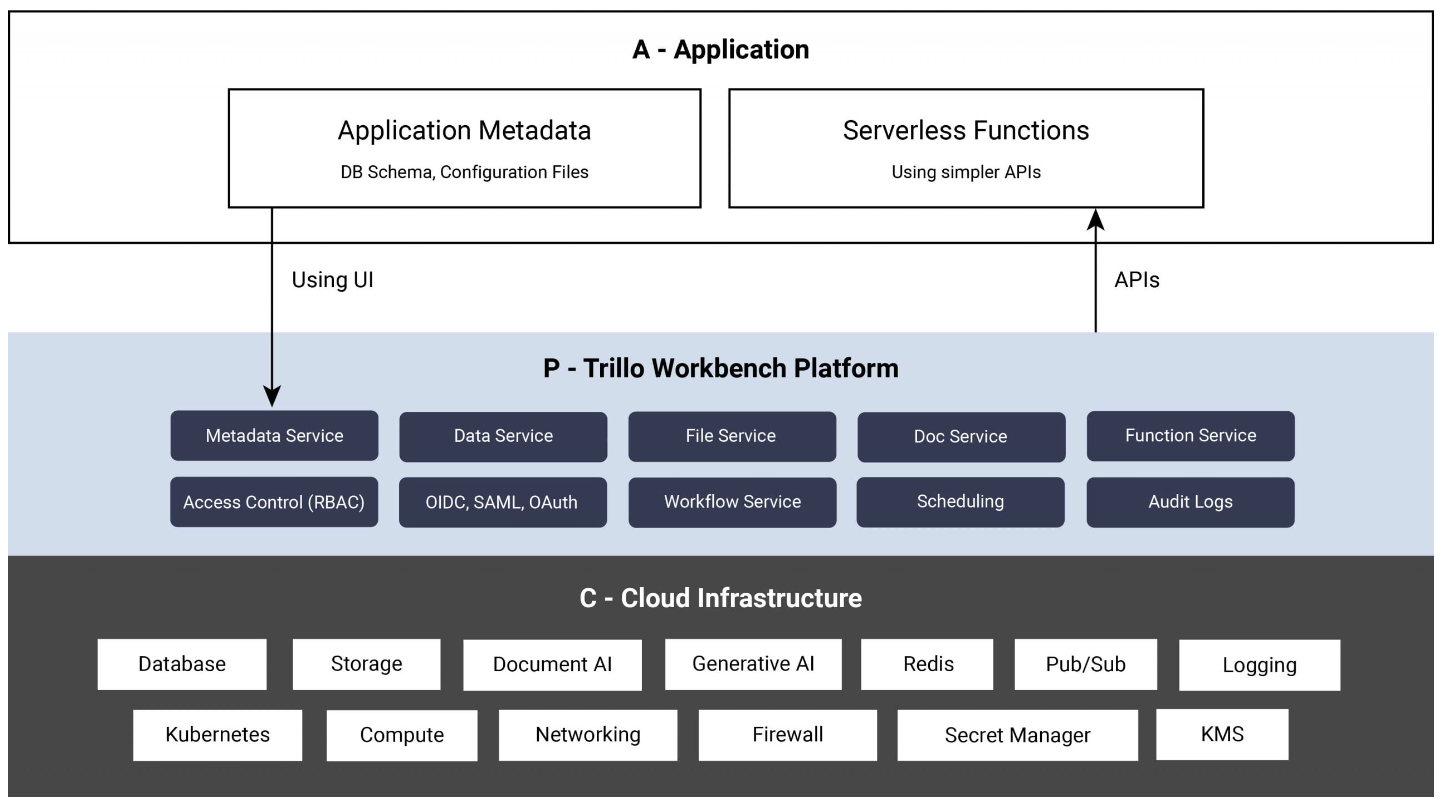
Using the above diagram, the process of building an application with and without Trillo Workbench is described below. It refers to 'A' (application), 'P' (platform), 'C' (cloud) from the above diagram.
Application using Trillo Workbench
- Trillo Workbench provides services in 'P' and hides the complexities of 'C'.
- Application engineers build 'A' – metadata and serverless functions.
Application using open source stack and without Trillo Workbench
- Platform engineers have to build 'P', therefore they need to know 'C'.
- Cloud engineers have to design and configure 'C'. Provide constant DevOp support.
- Application engineers building 'A' have to wait for 'P' to be available. In practice, they normally build on the half-baked 'P'.
- In the end, 'A' and 'P' are so intermingled that there is no reusable 'P'.
- A new project restarts from 'P' and 'A' all over.
1. Trillo Workbench FAQs
1.1 What platforms compare with Trillo Workbench?
The closest platform to Trillo Workbench is Microsoft Power Apps. Other similar products in the space are Salesforce, Outsystems, Appian, Mendix, and Zoho.
Trillo Workbench offers distinct advantages over its competitors in the following ways.
- Trillo Workbench uses code (functions) for business logic and workflows. Other products use diagrams and code. Diagramming, although good for requirements, leads to non-linear thinking and often has limitations during implementation. Due to its singular focus, coding in Trillo Workbench is simple, familiar, and easy to learn.
- Trillo Workbench implements serverless functions using a design that is convenient, optimal, and cost-effective.
- Trillo Workbench is unique as a low-code platform in the Document and Generative AI market. The generic application development capabilities act as a catalyst in delivering Document and Generative AI solutions.
- Trillo Workbench offers the highest-performing access control at record and column levels. It supports groups, roles, rules, classes, records, and attributes for access control definition. These access controls apply to search results, APIs, and databases. (RBAC support is expected in Q2 2024).
- Trillo Workbench is deployed in your private cloud, giving you full access to databases, buckets, machines, networking, etc.
- The Trillo Workbench license model is simple.
1.2 What services and features does Trillo Workbench provide to an application?
Services provided by Trillo Workbench include:
- Metadata Service – application metadata such as database schemas, configuration files, SQL query templates, schedules, and workflow definitions.
- Data Service – creates, alters, and operates on the database tables based on meta properties specified for each table and its columns. Using meta properties, it imposes access control rules. It provides CRUD, batch operations, and query APIs.
- File Service – manages files using native cloud bucket and object storage, including uploading, downloading, sharing, and supporting folder/file operations such as move, delete, and copy.
- Function Service – dynamically compiles and executes plug-in code. In the production environment, the code can be pre-compiled for performance and security.
- Workflow Service – executes functions in the background as tasks or workflows consisting of multiple steps. A function using workbench APIs implements a workflow of multiple steps. Each step, in turn, is a method, operator or a call to another function.
- Scheduling Service – schedules a function or workflow for the periodic execution.
- Firebase Notification – out-of-the-box integration with Firebase Notification for applications requiring a real-time push to a UI.
- Audit Logging – tracks workbench activities performed by a client program or backend tasks. Standardizing audit log records provides easy search and filtering. It serves multiple purposes: troubleshooting, operations management, and compliance.
- User Management – user management and authentication using a database or Google Cloud identity platform. Using SAML and OIDC, it can integrate with external authentication systems.
- RBAC – Trillo Workbench provides high performance access control based on roles, groups, and rules. It extends to record and attribute level.
- API Gateway – a client can access Trillo Workbench services using a built-in API gateway. The API gateway is OAuth 2.0 compliant.
- Git Integration – Trillo Workbench uses a database for storing metadata. It retains multiple versions of metadata and integrates with a git repository so an admin can push metadata and plug-in code to a git-repo. A workbench instance running in a different environment can pull code from Git.
Features provided by Trillo Workbench low code development platform include:
- Scalability (scaling Kubernetes cluster)
- Performance
- Reliability (fault tolerance & disaster recovery)
- Infrastructure Security (by environmental configuration)
Note that this is not an exhaustive list of services or features. Additional features are described in the documentation.
1.3 When developing an application with Workbench, what components are developed by the engineers?
The basic building blocks required for a Workbench application include:
- Data models and domain metadata.
- Functions (business logic).
- Workflows (functions written using Trillo API).
- Access control rules.
1.4 What are the limitations of Trillo Workbench?
Workbench is a Cloud-Based Application Development tool, extremely scalable and designed for complex, enterprise-level application development. In general, Workbench has very few limitations. However, there are a few application types that are not a good fit for Workbench. Examples of these would include AI/ML model training and streaming big data pipelines (there are specific cloud-native services that work better for these application needs).
1.5 How long has Trillo Workbench been in production?
Trillo Workbench has been available for nearly 6 years and is running applications in production environments for numerous companies.
1.6 What applications have been built using Trillo Workbench?
- File Manager: A DropBox or Google Drive-like application for managing files using cloud buckets. It's secure, encrypted, GDPR and HIPAA-compliant and includes the following features: accessible by both web UI (HTTPS) and SFTP, high availability, user and group-level access controls, upload and download links for external users, and scales to 100s of terabytes.
- Intelligent Document Manager: An intelligent document management system for managing documents and processing using advanced NLP models, including Large Language Models (LLMs). It delivers semantic search, summarization, and extraction of data from documents.
- Medical Curriculum Mapping for Medical Schools: Mapping course material on the outcome, scoring using AI NLP, and automating the end-to-end workflow. A multi-tenant application used by several medical schools.
- Data Warehouse Modernization: Ingesting data from several enterprise applications (Netsuite, Workday, Salesforce, Smartsheet, legacy, etc.) into Cloud SQL and Snowflake. Delivered Trillo Data Manager for master data management.
- Telemedicine: Multi-tenant telemedicine application for multiple medical practices.
- Manufacturing: A mission-critical application for manufacturing ATMs.
- Supply Chain: A supply chain management application for a grocery brokerage firm. It provides a conversational interface to salespeople on the road.
- Advanced Logistics: A fleet management application using advanced algorithms for fleet routing and real-time monitoring of vehicles and personnel using sensors and cameras.
2. Deploying Trillo Workbench
Trillo Workbench can be deployed in a GCP or Azure environment (and soon in AWS). Refer to the following document for additional information.
Trillo Workbench Installation Document
Once Trillo Workbench is deployed, you will receive a unique URL to the Workbench console, as well as a user ID and password. You can then log in to the console and invite other users to collaborate on your project.